Showing posts with label photoshop. Show all posts

Monday, April 12, 2010

OOTD: Oh My Goth!

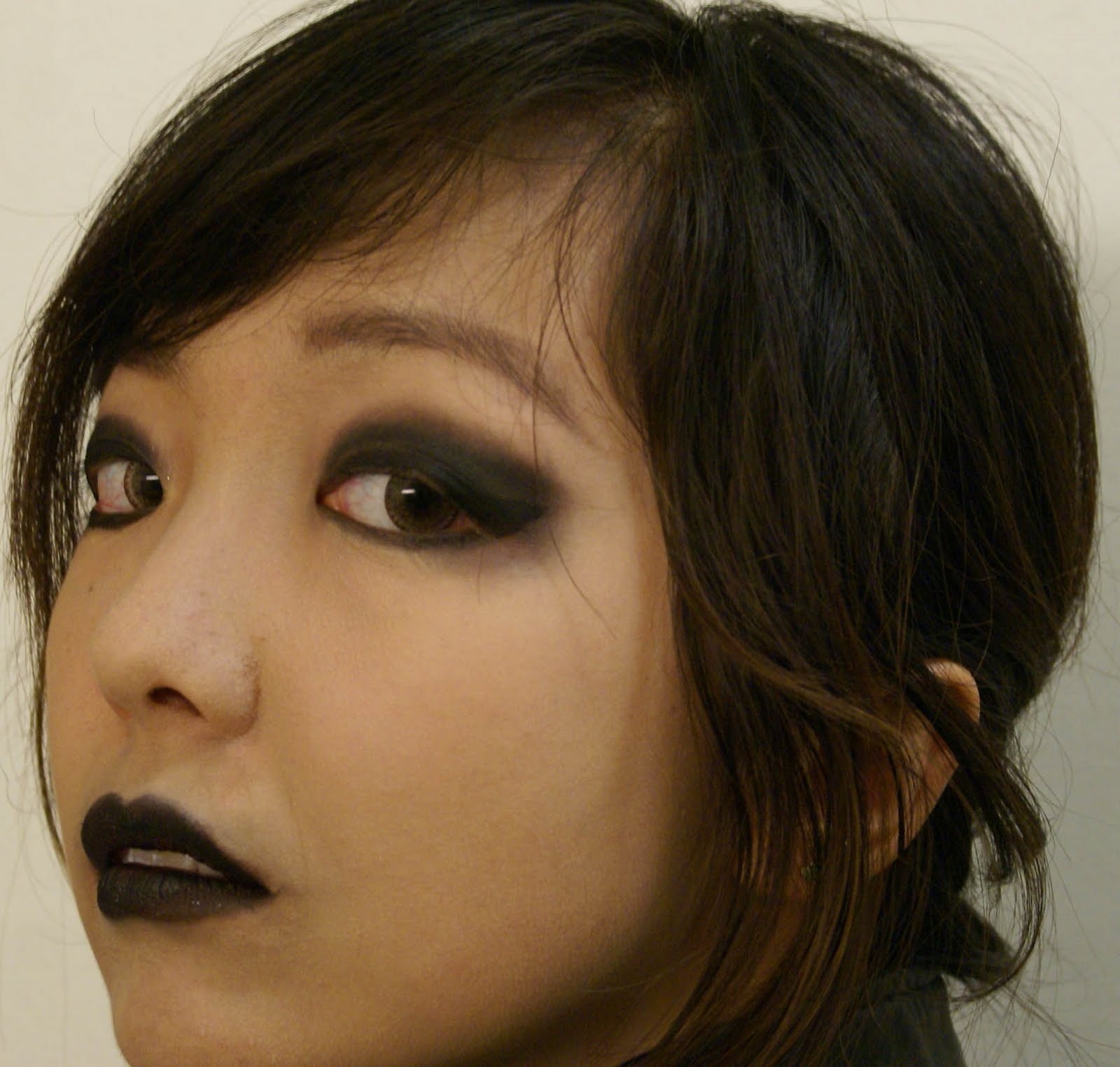
BOO! Sorry for the uber scary OOTD and makeup, but this blog is all about expression, am I right? :D This all started when my roomie put on some purple eyeshadow to make red lipstick a dark plum for a dress-up day at Assembly. I wish I got to attend such fun meetings all the time, but I usually dress up for the heck of it anyway. A few weeks ago was Tacky Day and I threw together an outfit so tacky, it can't be seen by the public. Last time was 90s Day, so aside from horrendously one-colored tops and pouchy butt-jeans and bad poofy hair, I couldn't think of anything. But the whole dark lips thing got me going on a cascade of goth. Hahahaa enjoy : )

On some of the pictures, I got that interesting washed-out colour background by going to Hue/Saturation and selecting Yellow and making Saturation = 0. That way, all the yellow colours are removed and there's still an eerie pop of bright shower items in the background. That's how I roll xD

Wearing:
Black Lace Cami, F21
Leather Jacket of AWESOMENESS, H&M
Bow Skirt, F21
Black Skinny Jeans, F21
Heels, Pitaya (they're 5 inch heels, I know)

Makeup:
Lots of Physician's Formula Mineral Concealer/Foundation in a shade too light for me
The usual ELF Studio basics
Lots more Anastasia Brow Wiz
ELF Mineral Black E/S
Lips: ELF Studio Creme Eyeliner in Black (hahaha but it worked! It's a weird blueish colour though compared to the eyes)
Contacts: Geo Nudy Brown (look scary like cat eyes especially now, don't they?)
 
I don't support animal abuse, but Fat Hamster was asking for it! Hahaha jk I love this fat baby
Have you ever played crazy dress up while bored? Better yet, did you have any weird phases in middle school? I went though a preppy phase followed by a semi-goth phase. I still have remnants of skulls and other Hot Topic wonderfulness in my jewelry box xD Great times ~

PS: I was at Ohio State University for a conference this weekend. It was awesome! I didn't bring my laptop, so it was almost 3 days without internet. Surprisingly, I found it very relaxing : )
Saturday, February 20, 2010

Photoshop Clone Tool: Make Anything Disappear!

I'm so excited! Today is a wonderful, beautiful almost-spring day in St. Louis and I'm about to head out with Meow Meow to do some shopping! I am doing my nails, which makes it difficult to type haha.


As some of you may know, I went to San Jose at the end of Winter Break to visit my boyfriend and we went to San Francisco for a day. I had never seen the Golden Gate Bridge before, so we went there and walked halfway across it. The whole story is for another time :D

I wanted to put our picture in front of the bridge as my Facebook Profile picture but I noticed a big ugly yellow caution sign in the background. The cure? Photoshop! Unfortunately in my fit of excitement I deleted all evidence of the original image. Use your imaginations xD
[click images to enlarge :D]

The sign in question:
Now to work some Photoshop magic:

The sign is magically disappearing! Notice the highlighted button in the left side toolbar. That is the clone tool. Basically you hold down Ctrl (or Command on Mac) while you select any colour in the image and then let go and click or drag or colour like you're using a marker with your mouse on the part you want to help camouflage. Like below, to make the white signpost disappear, I used the green grass colour and applied it on the white xD It's AWESOME!
Used some of the blue from the water to cover up the yellow:
Almost gone!
Where'd it go!?
Zoom out and finished!
This took like ... 5 minutes and it was super fun! Next we should erase the other people in the background hehehe. (And we're squinting in the photo because the sun was super bright)

Have fun cloning! [I just came back from shopping and bought some REALLY awesome things ^__^ Will share soon!]

Monday, January 18, 2010

Covergirl LashBlast Length: No Clumps!


Yesterday I went shopping for shampoo and conditioner, sea salt, essential things to begin the new semester. Of course I got sidetracked in Target and spent forever in the makeup aisle. I decided to try LashBlast because people have been saying good things about it and the brush looks well-designed. I love bright colours so the tube is also really cute.
Bristles:

One coat (excuse my bloodshot eyes):

No mascara:

Photoshopped awesomeness + one coat (thanks to my roomie):

Photoshopped awesomness + bare lashes:

Verdict:
- Clumps?: No clumps! I was really surprised but even though I got LashBlast Length in Very Black, it was still pretty light and watery. The cap on the tube before use was really smart in keeping the moisture in while on shelves.
- Curl: It didn't hold my curl as well as I would have wanted, but it's a very clean, natural looking mascara.
- Length: They got longer but not supremely long. False lashes are the way to go for my short short lashes :(
- Volume: Not much at all. There's a different LashBlast for it.
- Price: $7 or so - it's okay
- Buy again? Maybe, but most likely not
Overall: 6/10

Contacts: Geo Magic Color in Angel Violet

I was not paid in any way for this review; these are my opinions after use. This product was purchased with my own money. Results may vary from person to person.

Related Posts Plugin for WordPress, Blogger...